Spiga

Adobe Photoshop CS4(2008 Edition) With Crack Working


Adobe Photoshop CS4 is a leaked version from Adobe, which is currently in Beta stage. This package includes all features plus a workingKeygerator.

The Adobe® Photoshop® family of products is the ultimate playground for bringing out the best in your digital images and transforming them into anything you can imagine.

Ideal for:
Film, video, and multimedia professionals
Graphic and web designers using 3D and motion
Manufacturing professionals
Medical professionals
Architects and engineers
Scientific researchers
Size: 434MB


Download Here ...

Read More...

PodXp Blue Aero Pack


Bao gồm :
  • Pod Xp
  • Skin Winamp
  • Skin Window Blinds
  • Wallpaper


Download Here ...

Read More...

Perfect Uninstaller v6.2.1


Với Perfect Uninstaller
, bạn có thể tháo bỏ bất kì ứng dụng không cần thiết nào trong hệ thống một cách dễ dàng và nhanh chóng. Tiện ích Add /Remove Program trong Windows không thể tháo bỏ hoàn toàn mọi ứng dụng cùng các khóa registry hư hỏng.

Trái lại, Perfect Uninstall không chỉ có khả năng tháo bỏ hoàn toàn ứng dụng, mà còn có thể dọn dẹp các tập tin registry sót lại của ứng dụng đã tháo bỏ. Chương trình sẽ bảo vệ máy tính của bạn khỏi những lỗi registry, giúp cải thiện hiệu suất cùng tốc độ hệ thống.

Các tính năng và lợi ích :

- Nhanh hơn công cụ tháo bỏ có sẵn trong Windows.
- Cung cấp nhiều phương thức hiển thị danh sách ứng dụng : dưới dạng các biểu tượng, danh sách hay thông tin chi tiết.
- Loại bỏ các chương trình không tháo bỏ được bằng công cụ Add/Remove program.
- Dọn dẹp hoàn toàn các khóa registry trống/hư hỏng còn sót lại của ứng dụng.
- Bảo vệ registry khỏi các lỗi do các khóa trống/hư hỏng và cài thiện hiệu suất máy.
- Loại bỏ ép buộc các ứng dụng ẩn cài trong hệ thống.
- Chuyển nhanh đến thư mục cài đặt ứng dụng.
- Xem chi tiết chương trình cài trong máy để quyết định có nên tháo bỏ hay không.

------------------------------------------------------------------------------------------------------------------------------------

Perfect Uninstaller is a better and easier way for you to completely uninstall any unneeded application that standard Windows Add/Remove Program can't remove. Have you ever been bothered with software applications that can't be uninstalled by the standard Windows Add/Remove Programs? You are the right place!

What Perfect Uninstaller can do for you ?
* Uninstall / remove any unwanted application in your PC
* Forcibly remove unwanted programs that cannot be uninstalled completely from "Windows Add or Remove Programs" control panel applet.
* Clear registry entries and drivers that the applications left over
* Show detailed information of a certain application installed in your computer
* Completely remove Adobe Reader, McAfee, Aol Toolbar, AVG Anti-Virus, Norton 2006/2007 and much more difficult to completely uninstall applications! Start your free trial now!

With Perfect Uninstaller, you can uninstall any unwanted applications in your system easier and faster. The standard Add /Remove Program can not often completely uninstall all applications and broken registry keys.Unlike your own PC Add/Remove Program , Perfect Uninstall can not only uninstall the applications , but also clean the registry files left over themselves. It will protect your PC from corrupted registry errors , improving your PC performance and speed !

Features And Benefits
* Faster than the standard removal applet that comes with Windows.
* Provide different ways of application view to accord with your use habit: by Icons, by List, by Details.
* Remove programs that could not be removed by Add/Remove program.
* Completely clean the empty / corrupted registry entries that a certain application left over.
* Protect your registry from empty / corrupted errors and improve your PC performance.
* Forcibly remove hidden application installed in your system.
* Fast point to the folder where application installed..
* Check details of a certain program installed in your computer to decide whether to uninstall it or not.
* Easy of use and friendly user interface.
* Show details about currently installed applications.

Download Here ...

Read More...

Stardock WindowBlinds Enhanced 6.20 Build 102 Full


WindowBlinds là một chương trình mà cho phép người sử dụng Windows hoàn toàn thay đổi vẻ ngoài giao diện người dùng Windows. Những người sử dụng tùy biến Windows bởi việc sử dụng những kiểu trực quan được tạo ra WindowBlinds. Với những skins này, WindowBlinds có thể thay đổi cái nhìn những thanh tiêu đề, những viền, thanh chắn Nhiệm vụ, nút khởi động, thực đơn khởi động, những biểu tượng Thanh công cụ và thực tế mọi bộ phận của Windows khác!

Dựa trên nền WindowBlinds 5 trước đây, phiên bản số 6 mang đến cho người dùng XP và Vista 1 cách cảm nhận hoàn hảo chức năng Aero cùa Vista với hiệu ứng Glass. Với WindowBlinds 5 ta đã làm quen với hiệu ứng Glass, 1 cửa sổ với Khung nền trong suốt trong thật bắt mắt. Khi Vista ra đời giao diện ấn tượng của nó mà đã làm cho WindowBlinds phần đấu và đưa ra phiên bản 6 này. Giờ đây WinXP có thể cũng có 1 giao diện Aero hoàn hảo như Vista, với các tính năng Aero mà không cần phải cài Vista hoặc yêu cầu cấu hình card như Vista. Và với những người dùng Vista bản Stater hay Basic muốn cảm nhận sự sống động của hiệu ứng Aero nhưng do Đồ Hoạ Card hay do chỉ là Vista basic nên không thể mở được Aero, thì với WindowBlinds 6 bạn có thể tự do lựa chon Skin cho Windows mà vẫn có thể mở thêm Aero Glass trong suốt. Với người dùng Vista không chỉ chọn skin cho cửa sổ mà bạn còn có thể thiết kế skin cho SideBar nữa. Chức năng chỉnh giao diện Aero của Window nay đã được WindowBlinds hoà nhập làm 1, bạn có thể chỉnh 1 skin bất kỳ nào thêm độ trong nhiều hay trong ít, đổi màu cho nó.không những thế Windowblinds còn cho phép thay đổi độ trong suốt của từng thành phần của Window, như Start Menu, hay TaskBar hay Menu Bar v.v.. và điều nữa WindowBlinds 6 sử dụng tài nguyện ít hơn nhiều so với hiệu ứng của Aero do Vista tạo ra, điều này đồng nghĩa với việc Laptop sẽ xài pin đuợc lâu hơn mà không cần phải sữ dụng tính năng loại Aero để tiết kiệm năng lượng của Vista .


Một số điểm lưu ý là Aero của bản Vista Basic được WindowBlinds dựng lên chỉ có tác dụng đối với giao diện skin còn về tính năng 3D Flip thì bạn vẫn phải là Vista Home Prenium trở lên.
WinXP có được giao diện gần giống với Vista hơn bao giờ hết nhưng chỉ có giao diện thôi các tính năng nổi trổi của Vista không thể nào chỉ nhờ mình WindowBlinds mà giả lập được. 3DFlip không có đâu nhé. Muốn có bạn có thể xài thêm bản WindowFX của Stardock Cũng cho hiệu ứng Thumnails trên thanh TaskBar và Flip 3D ảo

WindowBlinds là chương trình duy nhất mà có thể tùy biến GUI XP mà không có việc phải thay đổi hệ thống DLLs.


Hướng dẫn Cr@ck

Cài đặt:
_ Cài đặt xong không nhấn finish vội
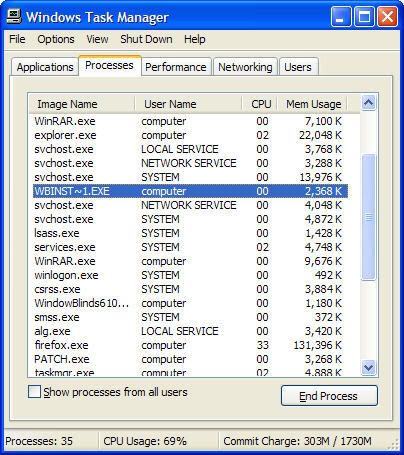
_ Mở Task Manager tắt tiến trình như hình dưới :

->Với vista:Tắt file WbVista.exe (and VistaSrv.exe if listed)
-> Với xp: Tắt fileWBINST~1.exe

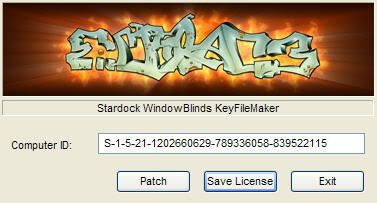
Chạy file P@tch nhấn nút P@tch :
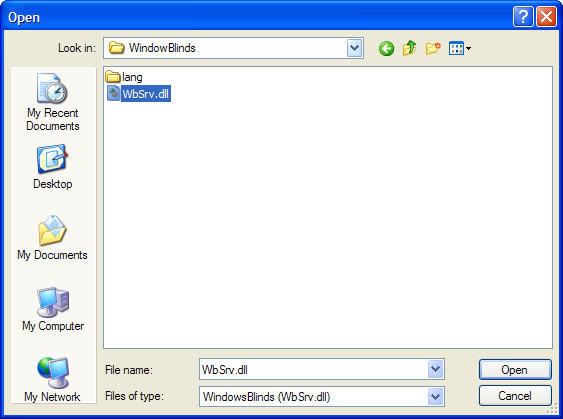
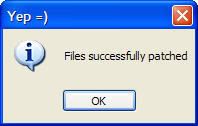
Khi bạn tìm đúng đến file WbSrv.dll rồi nhấn open sẽ xuất hiện thông báo

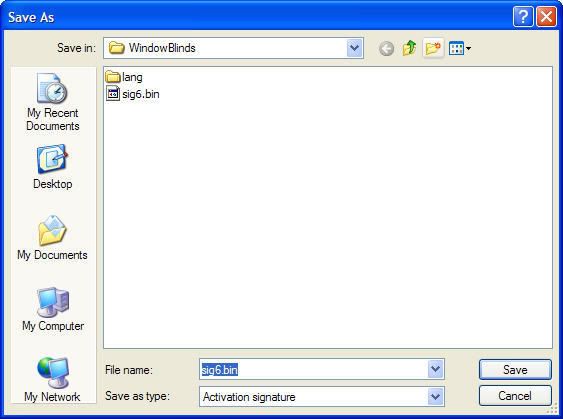
Bấy giờ nhấn tiếp nút Save License , ở khung thoại xuất hiện tiếp theo nhấn Save
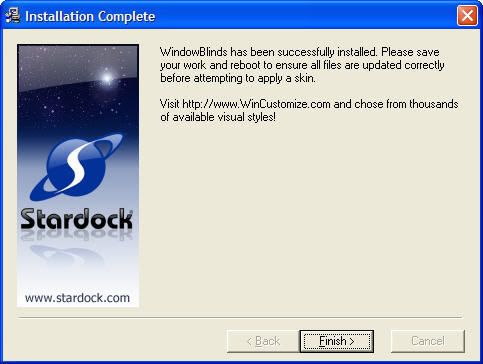
Nhấn Finish ở khung thoại Setup > Khởi động lại máy > OK !!!!!!!!!

Download Here ...

Read More...

Memory Improve Professional v5.2.1.5164


Memory Improve Professional : là phần mềm có thể điều chỉnh và tự động giải quyết những vấn đề với bộ nhớ và cũng là công cụ hữu ích để quản lý , điều chỉnh bộ nhớ hệ thống. Nó dễ dàng chỉ ra tình trạng tiêu thụ bộ nhớ và có thể (tự động hay người dùng tự chỉnh) dọn dẹp bớt những vùng nhớ thừa , không cần sử dụng đến. Nó cải thiện tốc độ làm việc của hệ thống bằng cách làm trống và chống phân mảnh bô nhớ. Điều này làm giảm tốc độ load và cải thiện sự thực hiện của ứng dụng.

Các tính năng chính :
• Làm tăng năng suất máy tính của bạn bằng cách làm trống bộ nhớ một cách an toàn .
• Làm trống bộ nhớ một cách tự động hay thủ công .
• Cải tạo bộ nhớ trong vòng vài phút .
• Chống phân mảnh bộ nhớ tự động hay thủ công .
• Thể hiện khả năng quản lí thông minh/ phân tích hoạt động hệ thống .
• Quản lý toàn bộ các tiến trình đang hoạt động trên máy tính .

---------------------------------------------------------------------------------------------------------------------

Use Memory Improve Professional to monitor and automatically resolve your memory issues. Windows is capable of running many programs at the same time. This is great for users, enabling the existence of some tools that work constantly in the background and provide useful services. Memory Improve Professional is one of such tools. it is a useful utility to monitor and manage system memory. It easily indicates the current state of memory consumption and can (automatically or manually) free up additional memory. It improves system performance by freeing and defragging memory. This decreases load time and improves application performance.

Main Feature
# Enhance your PC's performance by safely freeing memory
# Free up memory manually or automatically
# Reclaim memory in minutes
# Defrag memory manually or automatically
# Performs intelligent monitoring / analysis of system running
# Monitor all processes running on your PC

Download Here ...

Read More...

Xara3D v6


Xara3D là một phần mềm đồ họa 3 chiều gọn nhỏ. Nhỏ nhưng không có nghĩa là nó có chất lượng thấp hay làm ra những sản phẩm thua kém các phần mềm 3D phức tạp và đồ sộ đang có trên thị trường. Trái lại, chẳng những làm ra các file 3D có chất lượng rất cao, Xara3D còn có tốc độ nhanh hơn nhiều.

Các phần mềm khác đồ sộ do quá nhiều chức năng mà trong thực tế bạn chẳng bao giờ khai thác hơn 10 % chúng. Đã bự con, hao tốn nhiều không gian đĩa, các phần mềm này còn phức tạp, làm bạn phải tốn nhiều thời gian mới có thể sử dụng được.

Trong khi đó, Xara3D được thiết kế để chỉ làm một việc chính yếu là tạo các hình ảnh 3D. Nó rất dễ xài. Các hình ảnh 3D do nó tạo ra thích hợp cho việc thiết kế các trang Web. Xara3D có thể tạo các hình ảnh 3D chuyển động và xoay tròn với các format AVI hay GIF. Bạn có thể xử lý text, font, mức độ nổi 3D, loại cạnh nổi và ánh sáng theo ý thích của mình, cũng như chọn chiều quay cho các hình ảnh 3D. Có sẵn nhiều mẫu 3D và kiểu xoay cho bạn chọn và ứng dụng chúng một cách rất đơn giản. Và nhiều tính năng hấp dẫn khác nữa đang đợi các bạn khám phá...

-------------------------------------------------------------------------------------------------------------------------

Xara3D
is solely designed to create the highest quality 3D text and graphics, such as logos, titles, headings and buttons. It's the perfect way to add impact to your web pages, mailshots and presentations (all images are fully anti-aliased for that smooth, professional quality). Xara3D can also create awesome 3D animations in seconds - GIFs, AVIs and simple Flash movie sequences - and you can even enhance your desktop by saving any animation as a screensaver!

Features:

Creating and Importing
•Text headings can use any TrueType font. Nine fonts are included in the trial download and there are 60 on the CD. Simply select the font from the drop down menu and type away, you’ll create your first heading in seconds!
•Full text control, including alignment, sub- & superscript, line spacing, tracking and kerning values for individual characters or over whole selections
•Instant access to full character sets from within the text dialog - see screenshot
•Create non-text headings by importing 2D graphics as Windows metafiles (WMF and EMF) or CorelXARA/Webster files (XAR and WEB) and extruding the outlines - see examples - the Webster drawing package is included free with Xara3D!
•An automatic design-making tool instantly converts any text heading into a button, board or board with holes see screenshot - see examples
•Full anti-aliasing for the best possible on-screen display quality.

Editing and Applying Special Effects
•Interactive control over the 3D extrude depth - simply click and drag on the image
•Unlimited undo makes experimentation easy
•Real-time 3D positioning around three axes by simply dragging the image on screen
•Areas of text can be selected, and different attributes such as bevel, color, fonts, textures, animation and text settings applied
•The Style Picker allows you to easily grab any or all of the settings of one image and apply them to another - see screenshot
•A total of 27 different bevel types with adjustable bevel size - see screenshot
•Interactive, easy-to-use lighting controls (three adjustable light arrows which can be dragged on-screen) - see screenshot
•Flexible interactive controls over the color and/or texture of every part of the image, and the background
•A total of 37 textures are included in the download, and there are 400+ on the CD-ROM you receive when you purchase. You can also import your own GIF or PNG files
•Textures can be scaled, rotated and colored
•Images can be displayed with front and back faces, or can be made hollow
•Images can be matt or shiny
•Images can have a soft-edged shadow and an intuitive interface allows you to easily alter the shadow blur, transparency and color - see screenshot
•Real-time solid shading with optional error-diffusion dithering for top quality results.

Animation
•Images can be animated in many different ways (see examples), such as Rotate, Fade, Pulsate, Step, Fade and Swing, using a simple interface - see screenshot
•The Animation Picker lets you easily copy the animation settings of one image to another - see screenshot
•Apply different animations to individual characters or sections of text
•Step-through multi-page animations of different images
•The number of frames in a sequence, the rotation direction, the speed, pause and number of loops can all be selected through simple controls
•An animation time line allows you to step through each frame, pause and export a single frame
•Lights and text can be rotated separately
•Great for creating animated buttons.Animation
•Images can be animated in many different ways (see examples), such as Rotate, Fade, Pulsate, Step, Fade and Swing, using a simple interface - see screenshot
•The Animation Picker lets you easily copy the animation settings of one image to another - see screenshot
•Apply different animations to individual characters or sections of text
•Step-through multi-page animations of different images
•The number of frames in a sequence, the rotation direction, the speed, pause and number of loops can all be selected through simple controls
•An animation time line allows you to step through each frame, pause and export a single frame
•Lights and text can be rotated separately
•Great for creating animated buttons.

Download Here ...

Read More...
Symantec Network Access Control 11.0


Symantec Network Access Control 11.0 securely controls access to corporate networks, enforces endpoint security policy and easily integrates with existing network infrastructures. Regardless of how endpoints connect to the network, Symantec's award-winning network access control solution discovers and evaluates endpoint compliance status, provisions the appropriate network access and provides automated remediation capabilities.

Key Features
* Blocks or quarantines non-compliant devices from accessing the corporate network and resources.
* Hosts Integrity tests against pre-defined templates such as ##### level, service packs, antivirus, and personal firewall status, as well as custom created checks tailored for the enterprise environment.
* Provides pervasive endpoint coverage for managed and unmanaged laptops, desktops, and servers existing both on and off the corporate network.
* Provides a seamless integration with Symantec Endpoint Protection 11.0.

Homepage - Trang chủ


Download Here ...

Read More...